








Creating a comfortable and focused workspace is essential whether you’re working from home, studying, or managing personal projects. A well-organized desk setup can reduce distractions, minimize physical discomfort, and improve concentration. In this guide, we’ll explore practical tips you can implement to make your desk setup both comfortable and conducive to focus.
Why Your Desk Setup Matters
Your desk is more than just a surface to place your laptop or papers. It’s where you spend significant time, so its layout and ergonomics can directly impact your productivity, posture, and overall mood. A cluttered or poorly arranged desk can cause distractions and physical strain, while an optimized workspace encourages sustained attention and comfort.
Choosing the Right Desk and Chair
Desk Selection Tips
– Size and Space: Choose a desk that comfortably fits your work essentials without overcrowding. Ensure there’s enough surface area for your computer, notes, and any other tools you frequently use.
– Height: An ideal desk height allows your elbows to bend around 90 degrees when typing or writing. Adjustable desks or standing desk options can provide additional flexibility.
Chair Selection Tips
– Ergonomics: Invest in a chair with proper lumbar support, adjustable height, and comfortable cushioning.
– Posture: Your feet should rest flat on the floor (or a footrest), and your knees should be at or slightly below hip level to maintain good posture.
Organizing Your Desk for Maximum Focus
Clear the Clutter
Clutter can overwhelm your senses and distract your mind. Keep only the items you regularly use on your desk:
– Store non-essential items in drawers or separate storage.
– Use cable organizers to keep cords tidy.
Essential Desk Items
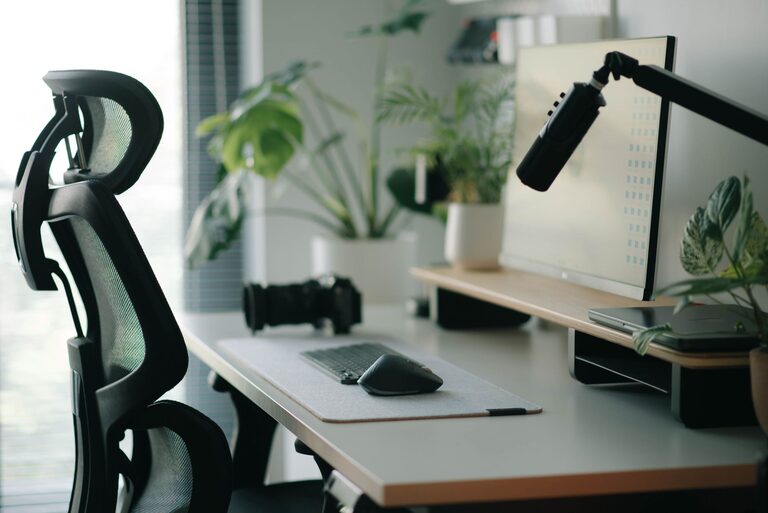
– Monitor or Laptop Stand: Elevate your screen to eye level to avoid neck strain.
– Keyboard and Mouse: Use an external keyboard and mouse if working on a laptop for better positioning.
– Lighting: Use a desk lamp with adjustable brightness to reduce eye strain, ideally positioning it to avoid glare on screens.
Personal Touches
Adding a few personal touches can create a welcoming atmosphere:
– A small plant can improve air quality and boost mood.
– Minimal decorations like photos or artwork can make the space inviting without distracting.
Ergonomic Setup for Comfort
Screen Positioning
Place your monitor about an arm’s length away, with the top of the screen at or slightly below eye level. This placement reduces eye and neck strain.
Keyboard and Mouse Placement
Your keyboard should be placed so your wrists stay straight and your arms stay close to your body. Consider a wrist rest if necessary.
Foot Positioning
Ensure your feet are flat on the floor or on a footrest to reduce pressure on your lower back and improve circulation.
Lighting and Environment
Proper lighting is critical in reducing eye strain and maintaining energy levels:
– Use natural light when possible, positioning your desk near a window.
– Avoid harsh overhead lights; softer, indirect lighting is easier on the eyes.
– Adjust screen brightness to match the ambient light.
Maintain a comfortable room temperature and minimize noise distractions with headphones or white noise if needed.
Breaks and Movement
Even with a perfect desk setup, it’s important to take regular breaks:
– Follow the 20-20-20 rule: every 20 minutes, look at something 20 feet away for 20 seconds to reduce eye fatigue.
– Stand up, stretch, or take a short walk every hour to promote circulation and refresh your mind.
Tips for Remote Work and Limited Space
If you’re working in a small area or shared space:
– Use vertical storage like shelves or wall organizers.
– Consider foldable desks or compact furniture.
– Make use of noise-cancelling headphones to create a focused environment.
Final Thoughts
Creating a desk setup that balances comfort and focus doesn’t require expensive equipment or a large space. Small adjustments to your desk layout, chair, lighting, and organization can make a big difference to your productivity and well-being. Take some time to evaluate your current workspace, and apply these tips to build a work zone that helps you do your best work comfortably.